One server is easy
In the last video, we packed the coffee app into a container. It runs the same everywhere.
On one server, that's easy. Start the container, and you're done.
But now the app is popular. You need ten copies, spread across five servers.
Which server runs which copy? What happens when one crashes at three in the morning? And how do you update all of them without taking the app down?
Doing that by hand doesn't work. That's the problem Kubernetes solves.
A cluster of machines
Kubernetes is a tool that runs your containers across many machines, and keeps them running.
The name comes from the Greek word for the person who steers a ship.
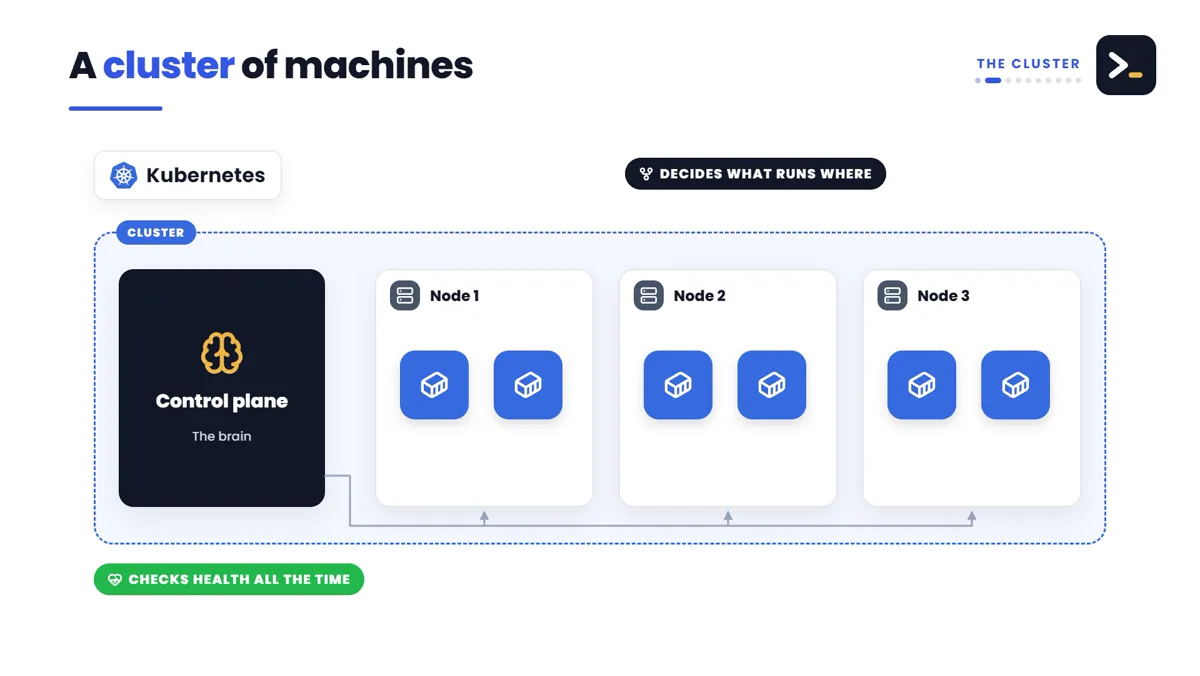
A group of machines running Kubernetes is called a cluster. Each machine is called a node.
One part of the cluster is the control plane. It's the brain. It decides what runs where, and keeps checking that everything is healthy.
Containers live in pods
Kubernetes doesn't run containers directly. It wraps each one in something called a pod.
A pod is the smallest thing Kubernetes runs. Usually one container, with its own address on the network.
Pods are meant to be temporary. Kubernetes creates them, replaces them, and throws them away all the time.
Describe what you want
So how do you tell Kubernetes what to run? You don't give it step by step instructions. You describe what you want.
You write a short file that says: run the coffee app, use this image, and keep three copies running.
That's called a deployment. You send it to the cluster with one command, and Kubernetes makes it happen.
This is the big idea. You declare the result you want, and Kubernetes keeps working to make reality match it.
It heals itself
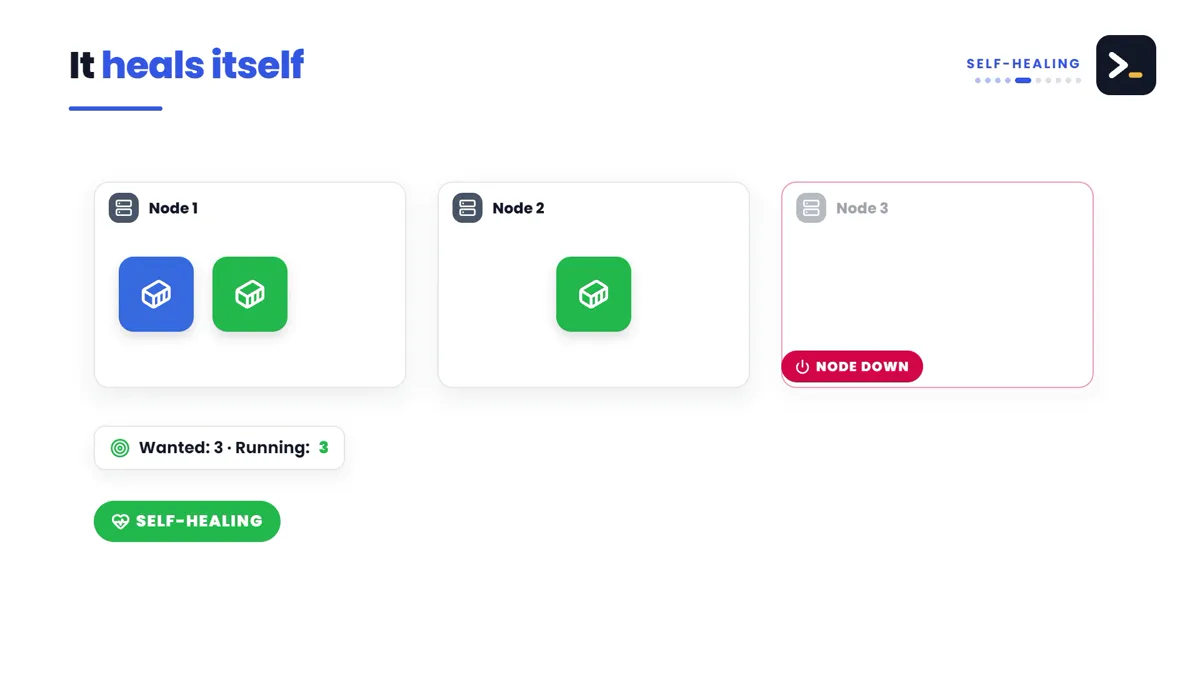
Now, say one of the pods crashes.
Kubernetes notices there are only two copies, but you asked for three. So it starts a new one. Nobody had to wake up.
Same if a whole node goes down. The pods on it get started again on the other nodes.
That's called self-healing. It's one of the main reasons teams use Kubernetes.
Scale with demand
Lunch rush. Orders are pouring in.
You change three copies to six, and Kubernetes spreads the new pods across the nodes.
Or you let it decide. An autoscaler watches how busy the pods are, adds more when traffic goes up, and removes them when it's quiet.
One stable name: a service
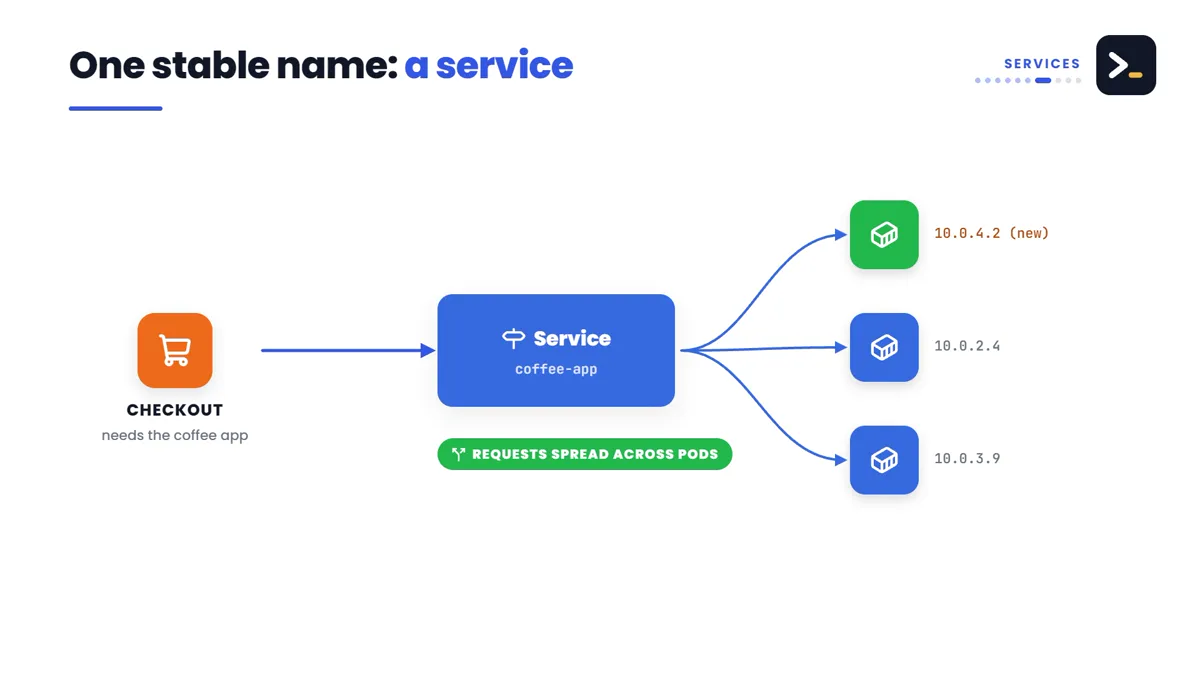
But here's a problem. Pods come and go, and every new pod gets a new address. So how does the rest of the app find them?
With a service. A service gives your pods one stable name, like coffee app.
Anything that needs the coffee app just talks to the service, and the service spreads the requests across whichever pods are running right now.
Rolling updates
Now you've built version two. How do you roll it out?
You update the image in the deployment file. Kubernetes replaces the pods a few at a time, and only moves on when the new ones are healthy.
Users never see the app go down. That's a rolling update.
And if version two has a bug, one command rolls it back to version one.
Do you need it?
So, should every app use Kubernetes? Honestly, no.
It's powerful, but it's also complex. There's a lot to learn, and a lot to run.
For a small app on one or two servers, Docker Compose or a simple hosting platform is often enough.
Kubernetes makes sense when you have many services, lots of traffic, or several teams shipping changes every day.
And most teams don't run it themselves. They use a managed version from a cloud provider, like Amazon, Google or Microsoft, who run the control plane for them.
Putting it all together
So let's put it together. A cluster is a group of machines, with a control plane as the brain.
Pods wrap your containers. A deployment says what you want, and Kubernetes keeps it that way, healing and scaling on its own.
Services give pods one stable name. And rolling updates ship new versions with no downtime.
That’s Kubernetes
That's Kubernetes. You say what you want. It keeps it running.