Meet Postgres
In the last video, the coffee app got a database. Today, let's look at the database most teams pick: PostgreSQL.
Most people just call it Postgres. It's free, it's open source, and it's been around for over thirty years.
And it just got a new version: PostgreSQL 19.
You don't need any database experience for this video. Every time a new word comes up, I'll explain it.
Here's the plan. First, the basics. Then, how much of an app Postgres can run on its own. And last, what's new in version 19.
Getting Postgres
So, how do you get Postgres?
The easiest way is a hosted service, like Supabase or Neon. Hosted means they run the server for you.
You sign up, click a button, and you have a Postgres database in the cloud, ready to use.
If you'd rather run it on your own computer, a tool called Docker can start it with one command.
Either way, you get a box where you type questions, and Postgres answers.
Tables and types
Postgres keeps data in tables. A table has rows and columns, a lot like a spreadsheet.
In our orders table, each row is one order. Each column is one detail about it.
But there's one big difference from a spreadsheet. Every column has a type.
A type is a rule for what's allowed in that column.
Text is for words, like the customer's name.
Integer is for whole numbers, like how many coffees.
Numeric is for money. It keeps prices exact, down to the cent.
And timestamp is for dates and times, like when the order was placed.
So if someone tries to put the word hello into the price column, Postgres refuses. That keeps your data clean.
Asking questions: SQL
To get data out, you ask Postgres a question. That question is called a query.
Queries are written in a language called SQL. It's built from a few simple words.
SELECT means: show me. FROM means: from which table. And WHERE means: only the ones that match.
So, select item, from orders, where customer is Maya. In plain English: show me the items Maya ordered.
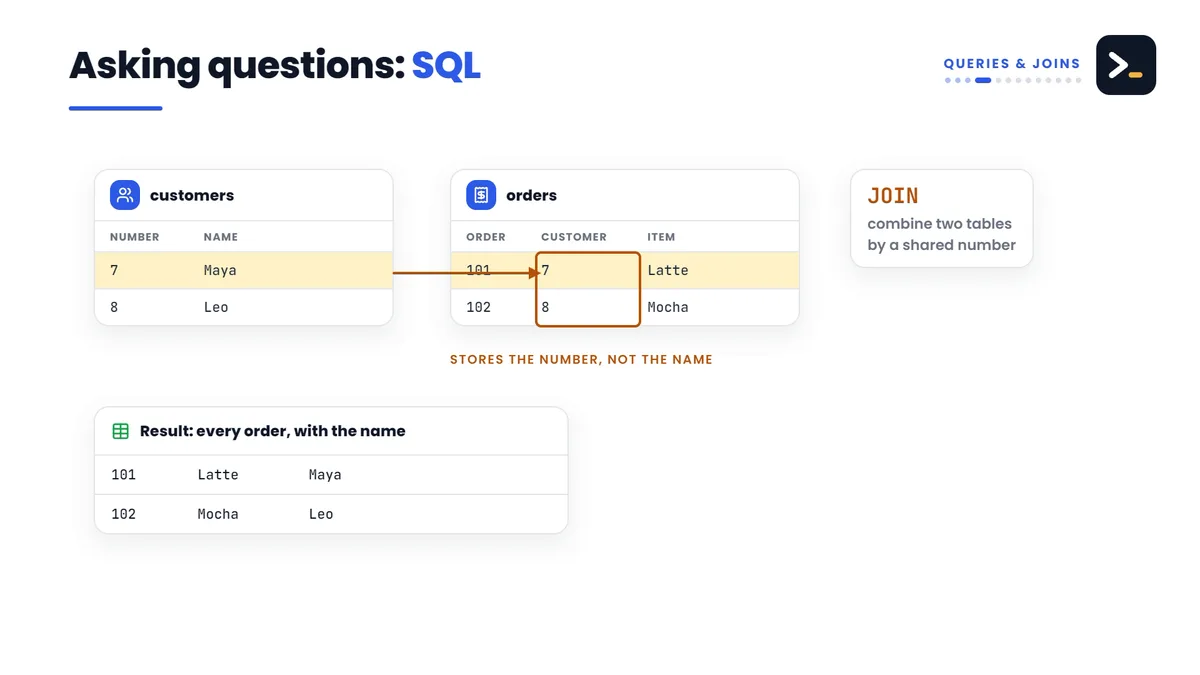
Now, our app has two tables. One for customers. And one for orders.
An order doesn't store the customer's whole name. It only stores the customer's number. That saves repeating the same name over and over.
But on the screen, you want to show the name. For that, SQL has another word: JOIN.
JOIN means: combine two tables, by matching that shared number. Order one oh one has customer number seven, and customer seven is Maya.
The result is one list, with every order and the right name next to it.
Why is it slow?
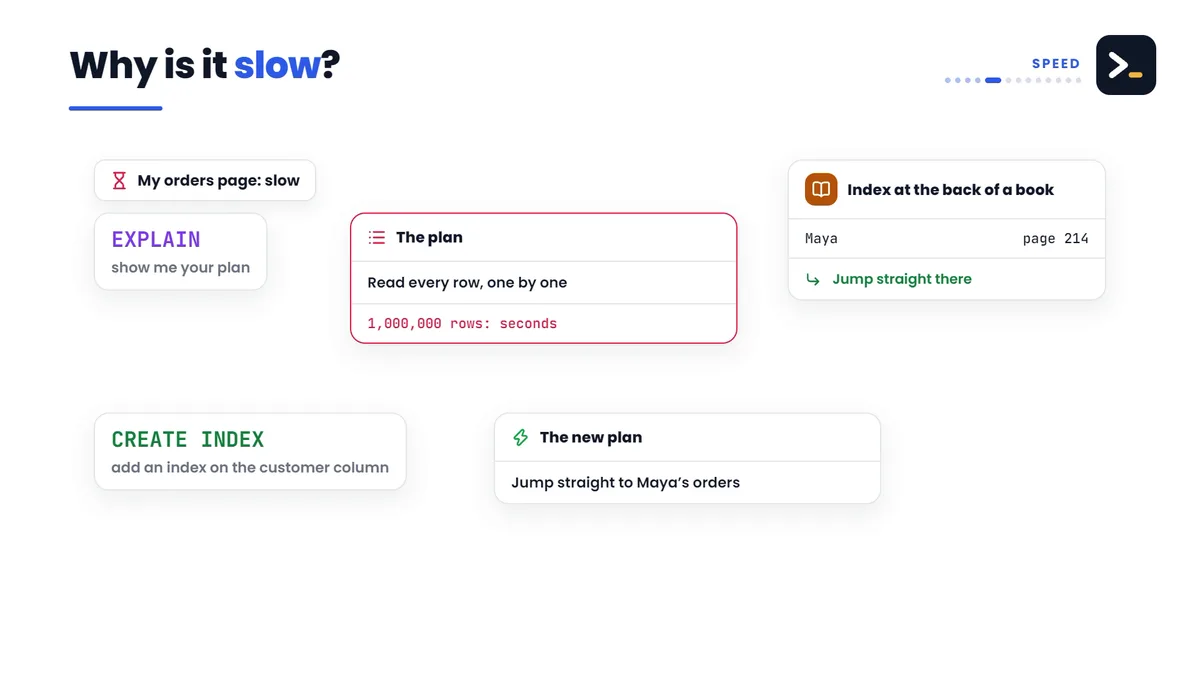
As more people use the app, the my orders page starts to feel slow.
To find out why, you put one word in front of your query: EXPLAIN.
Postgres then shows you its plan. How it's going to find the data.
Here, the plan says it will read every single row in the table. With a million orders, that takes seconds.
The fix is an index. It works like the index at the back of a book. Instead of reading every page, you look up the word, and jump to the right page.
Add an index on the customer column, and Postgres jumps straight to Maya's orders. Now the page loads in milliseconds.
All or nothing
One more basic. When someone buys a coffee, two things have to happen.
Save the order. And take one coffee out of stock.
Now imagine the server crashes right after the first step. The order is saved, but the stock never changed. Your numbers are now wrong.
A transaction fixes this. You group the steps together, and Postgres does all of them, or none of them. Never just half.
One database, many jobs
That's the basics. Now, part two. How much of your app can Postgres run on its own?
Most apps use lots of separate tools. One to store data. One for search. One for background tasks.
Postgres can handle a surprising amount of that by itself. Let's go through it, one at a time.
Start with custom drinks. One latte has oat milk. Another has an extra shot. Every order is a little different.
Making a column for every possible option gets messy. So Postgres lets you store these details as JSON.
JSON is just a simple way to write down details. Milk: oat. Shots: two. And you can still search it, like, show me every order with oat milk.
Search, built in
Next, the search box on the menu.
Postgres has search built in. Type caramel, and it finds every drink with caramel in its name.
With a free add-on called pgvector, it can even search by meaning.
Type something cold and sweet. It suggests the iced caramel latte, even though those words aren't in its name.
That's the same idea AI assistants use to find the right information.
Background jobs and live updates
After every order, the app sends a receipt email. But the customer shouldn't have to wait while it sends.
So the app just writes a note in a jobs table: send receipt for order one oh five. That note is called a background job.
A separate program, called a worker, checks the table, picks up the job, and sends the email.
Even with several workers running, Postgres makes sure two of them never grab the same job. So nobody gets two receipts.
Then there's the barista's screen. It needs to show new orders right away, without anyone pressing refresh.
Postgres can send out a small message the moment a new order comes in. The screen hears it, and the order pops up.
Safety and an instant API
Now, safety. A customer should only ever see their own orders.
Postgres can enforce that rule itself. It's called row level security.
You write the rule once: a customer can only see rows with their own number.
So even if the app has a bug, Postgres still won't show Maya's orders to Leo.
And services like Supabase can turn your tables into an API automatically. An API is how your app asks for data. So you don't have to write that part by hand.
Put it all together, and one Postgres can be your database, your search, your background jobs, your live updates, and your API.
A good rule when you're starting out: use Postgres for everything first. Add other tools only when you really need them.
Keeping it safe
Of course, if Postgres holds everything, you need backups.
A backup is a full copy of your database, saved somewhere safe.
Many teams also keep a replica. A replica is a second Postgres, on another server, that copies every change from the main one. If the main one breaks, the replica takes over.
And one tip people learn the hard way. Practice restoring your backup. A backup you've never restored might not work when you need it.
New in 19: REPACK
Now, part three. What's new in PostgreSQL 19. We'll look at three changes, one at a time.
The first one is about deleting data.
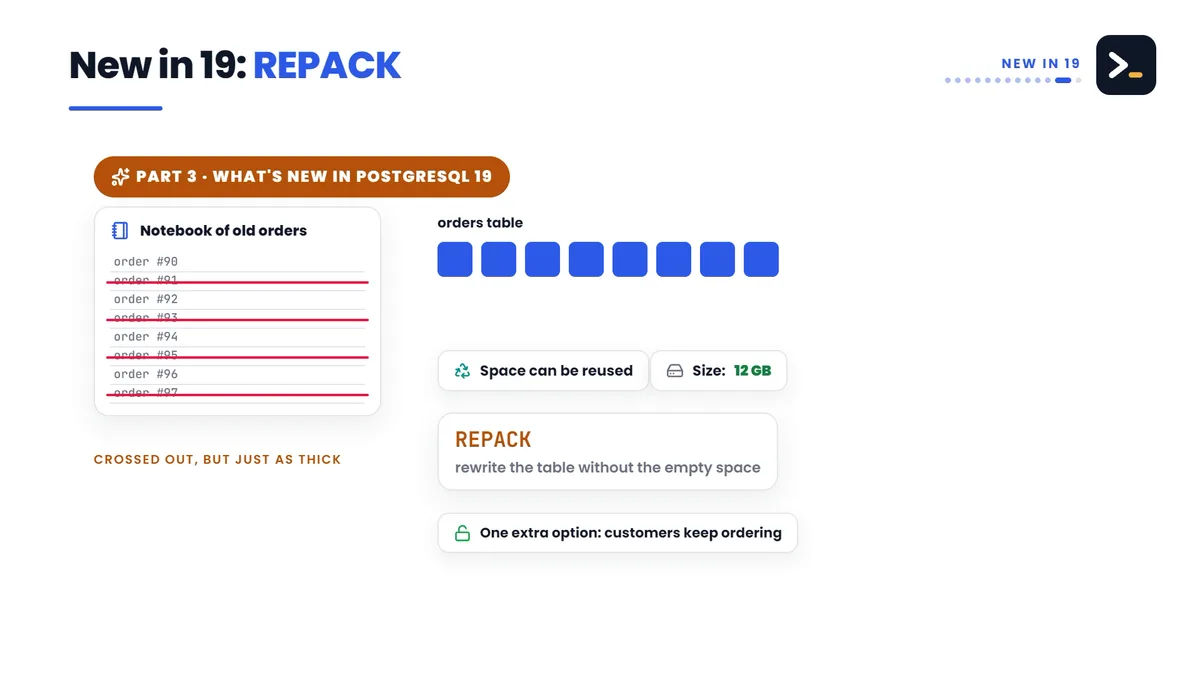
Imagine a notebook full of old orders. You cross out half of them. The notebook is still just as thick.
Postgres works the same way. When you delete rows, the empty space stays inside the table.
Postgres can reuse that space for new orders later. But the table itself doesn't get any smaller.
Postgres 19 adds a command called REPACK. It rewrites the table without the empty space, so it shrinks.
And with one extra option, it can do this while customers keep ordering. Before, this kind of cleanup locked the table, and the app had to wait.
New in 19: WAIT
The second change. Remember the replica? The second copy of the database?
Busy apps often save new data to the main database, but read data from the replica. That spreads out the work.
But the replica is always a tiny bit behind. So a customer places an order, opens their order page, and the new order isn't there yet.
Postgres 19 adds a WAIT command. It tells the replica: wait until you've caught up with that order, then answer.
So customers always see the order they just placed.
New in 19: no duplicates
The third change. Loyalty cards.
When a customer taps join, the app creates a loyalty card. But what if they already have one? You don't want two cards.
In Postgres 19, one command can say: create a card, but if one already exists, just give me that one.
In SQL, it's written as on conflict do select. On conflict means: if the card already exists. Do select means: then just show me that card.
One step instead of two. And no duplicate cards, even if someone taps the button twice.
Version 19 also makes some queries faster, and warns you if you still use an old, weak password method.
Putting it all together
So let's put it all together.
Postgres stores your data in tables, with types that keep it clean. Joins connect tables. Indexes make searches fast. And transactions keep your steps safe.
It can also run much of your app. Flexible data, search, background jobs, live updates, security, and an API.
Version 19 adds REPACK to shrink tables, WAIT so replicas are up to date, and an easy way to avoid duplicates.
And always back it up, and practice the restore.
That’s PostgreSQL
That's PostgreSQL. One database that can run almost your whole app.